
Every product is designed for a human being, yet not every product is designed around how humans naturally perceive information, understand what it means, and perform actions. A product may have beautiful visuals, powerful features, and sophisticated technology, but if people struggle to understand its interface, cannot notice important feedback, or find its controls uncomfortable to use, the experience becomes frustrating. This is where human-centred product design becomes essential. By understanding the relationship between the sensory system, cognitive system, and motor system, product designers can identify why interactions fail and how to transform them into experiences that feel clear, natural, accessible, and effortless. The objective is not simply to make a product functional; it is to make the product work in harmony with the people using it.
Understanding the User: Three Connected Human Systems
Human interaction with a product involves three closely connected capabilities. The sensory system helps us perceive information through sight, hearing, and touch. The cognitive system helps us interpret that information, connect it with our knowledge and expectations, make decisions, and learn. The motor system enables us to translate those decisions into physical actions, such as touching a screen, pressing a button, moving a mouse, or adjusting a control.
Consider using a digital payment application: the user must first notice the payment amount and recipient, understand whether the details are correct, and then perform the action to complete the transaction. If the amount is difficult to see, the recipient information is confusing, or the confirmation button is difficult to operate, the interaction can break down. Although these systems can be analysed separately, they work together throughout the experience. A successful product considers the entire journey from perceiving information to acting on it and understanding the outcome.
1. Sensory System: Design Products People Can Perceive
The sensory system is the first point of contact between a person and a product. Before users can understand information or interact with a control, they must be able to perceive the information presented to them. In product design, sensory considerations include visual design, auditory feedback, and tactile feedback.
These elements determine whether users notice important information, recognise interactive elements, understand when something has happened, and feel confident using a product in different environments. Sensory design is not merely about making a product attractive; it is about communicating information through the senses in a way that is clear, appropriate, and accessible.
Visual Design: Colour, Shape, Layout, and Visual Perception
Visual design influences what users notice first, how they distinguish different elements, and how easily they understand the information displayed. Colour, shape, size, spacing, contrast, typography, and layout all contribute to the way people perceive an interface. A well-designed interface establishes visual hierarchy, allowing users to identify the most important information without having to examine every element equally.
For example, in a banking application, the available balance, transaction amount, and payment confirmation should be visually distinguishable from secondary information. If every element uses the same size, colour, and emphasis, users must spend additional effort locating what matters. Similarly, colour should not be the only way to communicate meaning: a red error indicator should also include a clear message or symbol so that users with colour-vision deficiencies can understand the problem.
Designers must also consider the principles of visual perception, such as proximity, similarity, contrast, and grouping, because people naturally use these cues to understand relationships between interface elements. The goal is to make important information easy to notice and interpret, rather than forcing users to search for it.
Auditory Feedback: Notifications, Voice, and Confirmation
Sound can communicate information when users are not looking directly at a product or when visual attention is occupied. Notifications, confirmation tones, alarms, voice instructions, and warning sounds can help users recognise events and respond at the right moment.
For example, a microwave may produce a sound when its cooking cycle ends, while a navigation application can announce an upcoming turn without requiring the driver to keep looking at the screen. However, auditory feedback must be meaningful, distinguishable, and appropriate to the situation. Excessive notifications, repetitive alerts, unnecessarily loud sounds, or ambiguous tones can create distraction instead of helping users.
Designers should consider the context in which a product will be used, including noisy environments, quiet public spaces, and situations where users cannot rely on hearing. Combining sound with visual or tactile signals can make important feedback more reliable and accessible. The principle is simple: sound should communicate something useful, not merely indicate that the product has performed an operation.
Tactile Feedback: Physical Components and Tangible Interactions
Tactile feedback allows people to interact with and receive information from physical surfaces and controls. Buttons, switches, knobs, textured surfaces, and vibration can provide cues about where to touch, how to operate a product, and whether an action has been registered.
A physical keyboard, for example, gives users tactile confirmation that a key has been pressed, while a smartphone can use haptic vibration to confirm a selection or alert the user to an event. These cues can reduce the need to constantly watch the interface, particularly when users are performing familiar actions. However, tactile feedback is only effective when it is clear and consistent.
A button that feels identical to surrounding surfaces may be difficult to locate, while weak or excessive vibration may be overlooked or become annoying. Designers must consider the physical quality of controls, the strength and timing of feedback, and differences in users’ sensory abilities. Tactile design is especially valuable when it helps users understand an interaction through touch rather than requiring them to depend entirely on vision.
2. Cognitive System: Design Products People Can Understand
Perceiving information is only the beginning. Users must also understand what that information means, recognise the available choices, and decide what to do next. This is the role of the cognitive system, which includes attention, memory, learning, reasoning, decision-making, and problem-solving. A product creates cognitive friction when people must guess what a button does, remember complicated instructions, navigate confusing menus, or work out whether an action has succeeded.
Good cognitive design reduces unnecessary mental effort and helps users build an accurate understanding of how a product works. The objective is not to remove all thinking from the experience, but to reserve users’ attention for decisions that genuinely matter instead of making them solve avoidable interface problems.
Intuitive Interfaces: Aligning with User Mental Models
An interface feels intuitive when its behaviour aligns with users’ expectations and their understanding of how similar products work. These expectations, often described as mental models, develop through experience, cultural conventions, and previous interactions.
For example, users generally expect a shopping-cart icon to lead to the items they intend to purchase, a magnifying-glass icon to initiate a search, and a clearly labelled back control to return to a previous screen. When a product follows familiar conventions consistently, users can transfer existing knowledge instead of learning every interaction from scratch. Conversely, an interface becomes confusing when controls behave unexpectedly, familiar icons have unusual meanings, or the same action produces different results in different parts of the product.
Intuitive design does not mean that every interface must look identical; it means that the product should communicate its logic clearly and make important actions understandable. Designers can evaluate this through usability testing, observing whether first-time users can complete tasks without excessive instructions, hesitation, or incorrect assumptions.
Information Architecture: Organising Information to Reduce Cognitive Load
Information architecture concerns how information, functions, and navigation are organised within a product. A well-structured product helps users understand where they are, what is available, and how to find what they need. Poor information architecture forces users to search through unrelated categories, navigate unnecessarily deep menus, or remember where a feature was placed.
Consider an online shopping application with separate, clearly named areas for orders, saved addresses, payment methods, returns, and account settings. This structure allows users to form expectations about where each task belongs. If these functions are scattered across unrelated menus or labelled ambiguously, users must invest more attention in navigation than in accomplishing their goal. Good information architecture uses meaningful categories, familiar terminology, logical grouping, and consistent navigation. It also considers the difference between what makes sense to the organisation building the product and what makes sense to the people using it. The best structure reflects users’ tasks, language, and priorities rather than the company’s internal departments or technical architecture.
Error Handling and Feedback: Supporting Learning and Problem-Solving
Errors are inevitable in real-world interactions, but the way a product handles them can determine whether users recover quickly or become frustrated. Effective error handling helps people understand what went wrong, why it happened, and how to correct it.
For example, if a user enters an invalid email address into a registration form, a useful interface identifies the field and explains the required correction rather than displaying a vague message such as “Something went wrong.” Similarly, a payment application should communicate whether a transaction succeeded, failed, or is still processing.
Without clear feedback, users may repeat a payment unnecessarily or abandon a transaction that is actually underway. Good error handling also prevents mistakes where possible through sensible defaults, input validation, confirmations for consequential actions, and opportunities to undo reversible changes. Feedback should arrive at the appropriate moment and explain the outcome in language users understand. Instead of treating errors simply as user mistakes, designers should investigate whether the product’s instructions, controls, or feedback contributed to the problem. This approach turns errors into opportunities to improve both the product and the user’s understanding of it.
3. Motor System: Design Products People Can Operate
The motor system enables people to perform the physical actions required to use a product. These actions may involve reaching for a control, pressing a button, dragging an object, swiping a screen, speaking a command, or manipulating a physical component. Motor-related friction arises when an action requires excessive effort, precise movements, uncomfortable postures, or repeated attempts.
A control can be visually clear and cognitively understandable yet remain difficult to use if it is too small, poorly positioned, physically demanding, or incompatible with the user’s abilities. Motor-oriented product design therefore considers ergonomics, accessibility, and interaction design together. Its purpose is to ensure that users can translate their intentions into successful actions comfortably, accurately, and reliably.
Ergonomics: Comfortable Use Without Unnecessary Strain
Ergonomics examines how products fit human physical capabilities and limitations. It considers factors such as body posture, reach, grip, force, movement, repetition, and duration of use. Good ergonomics can make a product easier to operate while reducing discomfort and unnecessary physical strain.
For example, a computer mouse should fit comfortably in the user’s hand, allow practical access to its buttons, and support the kinds of movements required during extended computer work. Similarly, the placement of controls on a vehicle dashboard should account for the driver’s reach, visibility, and need to maintain attention on the road. Poor ergonomic decisions can turn frequent everyday tasks into uncomfortable experiences, particularly when a product is used for long periods.
Ergonomics is not limited to physical equipment: digital products also involve motor demands, including the distance a thumb must travel on a phone, the precision needed to select a small target, and the repetition required to complete a task. Designers should test products with users of different body sizes, physical capabilities, and usage patterns rather than assuming that one configuration suits everyone.
Accessibility: Usable by People with Different Abilities
Accessibility ensures that people with different physical, sensory, and cognitive abilities can use a product effectively. In motor design, this includes considering users who have limited dexterity, reduced strength, tremors, restricted movement, or difficulty performing precise gestures.
A touchscreen interface that depends on small targets and complex swipes may work well for some users but create barriers for others. Larger interactive targets, adequate spacing, alternative input methods, keyboard support, voice control where appropriate, and reduced reliance on complex gestures can improve usability for a broader audience. Accessibility also benefits people whose abilities are temporarily or situationally limited, such as someone using a phone with one hand while carrying a bag or interacting with a device while travelling.
It should not be treated as a final adjustment made after the product is complete. Considering accessibility during research, design, development, and testing helps teams identify barriers earlier and avoid unnecessary redesign. The central principle is that products should adapt to human differences wherever practical, rather than expecting every user to interact in exactly the same way.
Interaction Design: Making Actions Easy and Efficient
Interaction design focuses on how users perform actions and how a product responds throughout the interaction. It considers the sequence of steps, the placement of controls, the relationship between an action and its outcome, and the feedback that helps users understand what happened. Good interaction design makes the next action discoverable, reduces unnecessary steps, and provides clear responses when users interact with the product.
For example, a well-designed mobile payment flow allows users to select a recipient, enter an amount, review important details, and confirm the payment without navigating through unrelated screens. The confirmation should clearly communicate the result, while important actions should be easy to distinguish from secondary controls.
Physical and digital products both benefit from this principle. A well-positioned button, a responsive touchscreen, or a gesture that behaves consistently can make an interaction feel natural. By contrast, controls that are difficult to reach, actions that require unnecessary repetition, and interfaces that fail to acknowledge user input create friction. Interaction design succeeds when the action users intend to perform maps clearly to the action the product requires and produces the expected result.
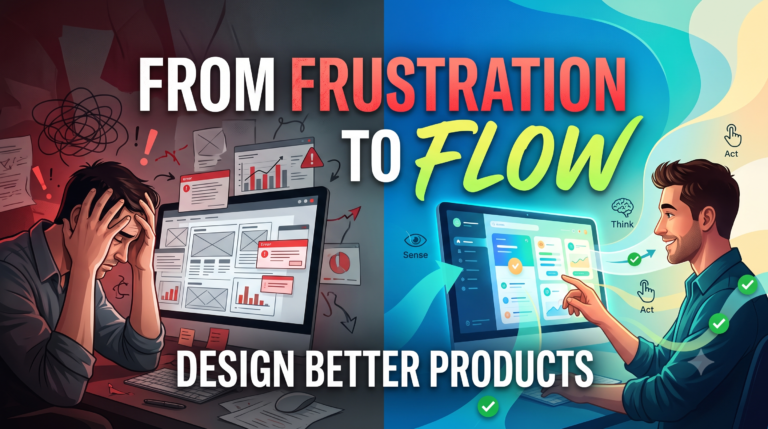
Bringing the Three Systems Together: From Friction to Flow
The real value of the sensory, cognitive, and motor perspectives emerges when they are considered together. Imagine a person withdrawing cash from an ATM. The user must first perceive the screen instructions and available options. They must then understand the choices, identify the correct transaction, and make a decision. Finally, they must physically enter their PIN, select the relevant controls, collect the cash, and retrieve their card. If the screen has poor contrast, the sensory experience suffers. If the menu uses unfamiliar terminology, the cognitive experience suffers. If the buttons are difficult to reach or operate, the motor experience suffers. Even if the ATM is technically functional, these problems can make the complete task stressful and inefficient. A better design considers all three dimensions: readable information, logically organised steps, accessible controls, clear feedback, and a predictable completion process. The same analysis can be applied to healthcare equipment, vehicles, home appliances, websites, mobile applications, and emerging AI devices. In each case, the designer examines the entire interaction rather than evaluating features in isolation.
A real-world example of what happens when human interaction is not adequately supported is the Humane AI Pin, a screen-free wearable AI device that relied on voice, gestures, and projected information. Reviews criticised aspects of its visibility, response speed, usability, and everyday practicality, and its consumer service was eventually discontinued. Its outcome cannot be attributed to usability alone, because product value, reliability, pricing, battery performance, and competition also matter. However, the case reinforces an important principle: a novel interaction method is not automatically a better interaction method. A product must help people perceive its output, understand its behaviour, and perform the required actions under real-world conditions. Innovation creates value when the experience works for the person using it, not merely when the technology itself is impressive.
Applying the Framework in Product Development
Design teams can use these three systems as a practical lens throughout the product development process. During user research, they can observe what information people notice, where they hesitate, what they misunderstand, and which actions they find difficult. During concept development and prototyping, they can evaluate whether visual signals are noticeable, the interface matches users’ expectations, and the required actions are physically practical. During usability testing, they can observe task completion, errors, hesitation, repeated attempts, comfort, and confidence.
For example, if users repeatedly miss an important button, the team should investigate visual hierarchy and placement before assuming users need more training. If they click a control but cannot tell whether the action succeeded, the team should examine feedback. If users understand the task but struggle to complete it accurately, the team should investigate the physical interaction and available alternatives. This approach helps designers identify the underlying cause of friction instead of treating every problem as an isolated interface defect. It also works alongside established methods such as Design Thinking, accessibility testing, prototyping, and usability evaluation, providing a consistent set of questions to guide decisions.
Conclusion: Design for Humans, Not Just Features
Great product design begins with understanding that people do not interact with isolated features; they experience a complete system of information, decisions, actions, and outcomes. The sensory system helps users perceive what matters, the cognitive system helps them understand and decide, and the motor system enables them to act. When these dimensions work together, products become easier to learn, more comfortable to use, and more reliable in everyday situations. When they are neglected, even technically sophisticated products can introduce avoidable friction.
The next time you design a product, evaluate an interface, or explore an innovative idea, ask three fundamental questions: Can people perceive it? Can they understand it? Can they act on it? These questions encourage teams to look beyond specifications and examine whether a product genuinely supports the people it is intended to serve. Moving from frustration to flow is not about removing every challenge or making every interaction identical. It is about designing experiences that respect human abilities, reduce unnecessary effort, and help people accomplish meaningful goals with confidence. Ultimately, the strongest products are not simply those that work; they are those that work naturally for the people who depend on them.